

POS financing integration is the connection between your checkout, whether that is a terminal, a tablet, an invoice link or an ecommerce cart, and one or more lenders, so a customer can apply, get a decision and pay for the purchase without leaving the sale. A well-built integration does four things: it presents the offer at the right moment, passes customer and order data to the lender, returns a decision in seconds, and sends the funding and reporting back to your books. This guide explains each layer, the integration methods, the compliance points that matter, and how to test the result.
TL;DR
- Integration means linking your POS or ecommerce platform to a financing platform through a plug-in, API, hosted link or widget, so applications and approvals happen inside the sale.
- Start by inventorying your systems, average ticket and customer credit mix, then choose single-lender or multi-lender routing to match.
- Plan for lender enrollment, credentials, testing and staff training, and review contract terms such as commitment length, termination fees and reserves before you sign.
- Disclosure, adverse action and card-data security rules apply to the checkout experience you build, so involve your lender and processor early.
- Measure approval rate, take rate, average ticket lift and funding time after launch, and fix the weakest step first.
Table of Contents
- What POS financing integration actually connects
- How the checkout flow works, step by step
- Check your systems before you choose a provider
- Integration methods compared
- The implementation workflow
- How data moves through an integrated checkout
- Single-lender or multi-lender: choosing the structure
- Perspective: what we see when integrations succeed
- Costs, resources and timeline to plan for
- Compliance: disclosures, adverse action and card data
- Test the integration, then measure it
- Where ZipLoan fits
- FAQ
- Sources
What POS financing integration actually connects
Three systems sit in every integrated financing checkout. The first is your front end: a POS terminal, a quote or invoice tool, or an online cart. The second is the financing layer: an application, a decision engine and one or more lenders. The third is your back office: payment processing, accounting and reporting.
Integration is the set of connections between them. The front end hands the financing layer an order amount, a customer identity and a merchant ID. The financing layer returns a decision, offered terms and, once the customer accepts, a funding commitment. The back office then receives the settlement and the transaction record so your books reconcile without manual re-entry.
This is different from simply accepting cards. A card sale is authorized by the customer’s issuer. A financing sale is underwritten by a lender, which means credit rules, disclosures and funding timelines come into play. If you want the fundamentals first, our overview of point-of-sale financing covers the product types, and the POS financing solutions page shows how they apply to retail.
How the checkout flow works, step by step
Whatever the technology, the customer-facing sequence is consistent:
- Offer. The customer sees financing at the point of decision: a monthly-payment estimate on a product page, a prompt at the counter, or a link on the estimate.
- Application. The customer enters basic details. Many programs begin with a soft-pull pre-qualification so shopping does not affect a credit score before the customer chooses an offer.
- Decision. The platform returns an approval, a decline or a counteroffer. In a multi-lender setup, the application cascades from one lender to the next until a match is found.
- Acceptance. The customer reviews terms, signs electronically and the platform issues a funding commitment.
- Fulfillment and funding. You release the goods or complete the service, confirm delivery or completion, and the lender funds you.
- Reconciliation. The funded amount, any merchant fee and the order reference land in your reporting.
Every handoff is a place where an integration can fail or add friction, which is why the rest of this guide follows the data through each one.
Check your systems before you choose a provider
Start with an audit rather than a vendor demo. Write down:
- Your POS and ecommerce platform, including versions, and whether they support plug-ins, APIs or custom payment methods.
- Where sales originate. In-store, on-site, by phone, at a customer’s home or through a sales rep with a tablet each need a different entry point.
- Average ticket and range. Financing matters most where the purchase exceeds what customers pay comfortably from a card or cash. Repairs, procedures, furniture, jewelry and remodeling projects are typical.
- Customer credit mix. If a meaningful share of your buyers are declined elsewhere, a single prime lender will leave sales on the table.
- Accounting and processing stack. Decide where financing proceeds should post, and how they should match to your existing merchant accounts so reconciliation is automatic.
If you run Square or Shopify, platform-specific routes exist; see our guides to Square financing integration and Shopify financing integration. For custom storefronts, integrating financing on your own site covers the options in more depth.
Integration methods compared
Most financing platforms offer several ways in. The right one depends on your technical resources and how many channels you sell through.
| Method | Best for | Technical effort | Typical trade-off |
|---|---|---|---|
| Hosted application link or QR code | Service businesses, quotes, phone sales | Minimal | Customer leaves your system briefly; reconciliation is often manual or by portal |
| Merchant portal (no integration) | Small shops starting out | None | Staff keys the sale; no automation |
| Plug-in or app for a platform | Shopify, Square and similar | Low | Limited to what the plug-in exposes |
| Embedded widget or SDK | Custom ecommerce, branded checkout | Moderate | Needs developer time; most control over the experience |
| Full API | Larger merchants, multiple channels | High | Maximum flexibility; you own testing and maintenance |
| Wallet or card-network route | Online checkout wanting buy-now-pay-later options | Low to moderate | Terms and lender choice set by the wallet |
On the wallet route, Google documents that merchants can offer several buy-now-pay-later options through Google Pay with no additional integration cost, and that those providers process through virtual cards on the Visa network. That suits online sellers who want pay-over-time options with little build work, but it does not replace a program in which you choose lenders, credit tiers and payment structures.
The implementation workflow
A typical rollout moves through the same stages regardless of platform:
- Define the program. Decide which products you will offer: installment loans, lease-to-own, no-credit-check options or private label credit. Match them to your ticket sizes and credit mix.
- Enroll with the lender or platform. Merchant underwriting and agreements come first, and they set your fee structure.
- Obtain credentials. Sandbox and production API keys, merchant IDs and any webhook endpoints.
- Connect the front end. Install the plug-in, embed the widget or SDK, or configure the hosted link in your quote and invoice templates.
- Add messaging. Show estimated monthly payments on product or service pages, and prompt staff to raise financing before the customer reaches the register.
- Map the money. Route funding and fees to the correct accounts and decide how refunds, returns and cancellations will flow back.
- Test end to end in the sandbox, then with a live low-value transaction.
- Train staff and launch.
The accounting step deserves more attention than it usually gets. Where financing touches inventory-heavy businesses, the transaction has to be tied to a specific item and its margin. Dealers who track profit per unit will recognize the discipline described in this walkthrough of floorplan fee accounting for dealers, where every cost and fee is assigned to the individual vehicle. Apply the same logic to financing fees: assign them to the sale they belong to, so your gross margin reflects what the deal actually earned.
How data moves through an integrated checkout
Tracing the data tells you what to verify during testing.
Order data. Your system sends amount, line items, merchant ID and a unique order reference. If the reference is not passed, matching a funded loan to a sale becomes manual work.
Customer data. Name, contact details and, for the application, the identifiers a lender needs. Your integration should pass only what the lender requires, and sensitive fields should travel over encrypted connections directly to the lender rather than being stored in your systems.
Decision data. The lender returns approval status, the amount, the term and the rate or fee structure. In a multi-lender waterfall, the platform handles the cascade and returns a single result to the customer, so your checkout does not need to know which lender approved. Our multi-lender financing options page describes how that routing broadens approvals across credit profiles.
Status events. Webhooks or polling tell your system when an application is approved, accepted, funded, cancelled or returned. These events trigger fulfillment, release of goods and accounting entries.

Settlement data. Funding batches, merchant fees and adjustments. North’s guidance on connecting POS, ecommerce, accounting and reporting makes the general point that linked systems reduce manual re-entry and let transactions, refunds and reports synchronize automatically. The same applies to financing: the fewer places a person retypes a number, the fewer errors reach your books.
Single-lender or multi-lender: choosing the structure
A single-lender program is simpler to set up and gives you one agreement, one set of terms and one point of contact. It works when your customers cluster in one credit band or you have a strong lender relationship, such as a store card program.
A multi-lender platform routes each application through a sequence of lenders, typically from prime toward subprime, so a customer declined by one can still be approved by another. For merchants with varied customers, this raises the share of applicants who leave with a way to pay. The integration effort is generally the same, because you connect once to the platform rather than to each lender.
One caution applies to both: approval is not guaranteed for any customer, and “no credit check” products are structured differently from loans, with their own cost profiles. Our piece on no-credit-check customer financing sets out what these programs can and cannot do.
Perspective: what we see when integrations succeed
We build ZipLoan around a simple view: financing only helps when it is available to the customers who need it, at the moment they decide. That has shaped how we think about integration.
First, coverage beats elegance. A beautifully embedded widget that declines a third of your applicants has not solved your problem. We offer both single-lender and multi-lender structures for all credit types because merchants in automotive repair, healthcare, furniture, jewelry and home improvement rarely have a uniform customer base.
Second, the staff conversation matters as much as the code. The best technical connection fails if no one raises financing before the customer reaches the register. Build the prompt into your quote, estimate or treatment-plan process, not only the final payment screen.
Third, keep the first launch simple. A hosted link or portal gets you live quickly, and you can move to an embedded or API connection once you have volume data that justifies the build. Our portal access page is where merchants start managing applications.
— Joe
Costs, resources and timeline to plan for
We do not publish a universal price for integration because it depends on the method and the program. What you can plan for is the structure.
- Platform or program fees. Some providers charge a license or setup fee, some charge transaction-based merchant fees, and some combine them. Ask for the full fee schedule in writing.
- Customization. Branded widgets, custom payment programs and API work may carry separate development costs.
- Processing costs. Sekure Merchants lists authorization, PCI, monthly-minimum, statement and gateway fees among the charges that shape what a processor really costs, and notes that your effective cost depends on your transaction mix and volume. Financing flows alongside processing, so review both.
- Contract terms. The same source points to commitment length, early termination fees and reserve requirements as terms to evaluate before signing. Apply those questions to any financing agreement too.
- Internal time. A hosted link needs mostly staff training. A plug-in needs an administrator for configuration and testing. An SDK or API build needs a developer, a QA pass and a plan for maintenance when your platform updates.
Timelines follow the method: link-based programs can go live as soon as merchant approval is complete, while custom builds take as long as your development and testing cycle. Ask your provider for a realistic schedule based on your platform rather than a generic promise.
Compliance: disclosures, adverse action and card data
Financing at checkout is regulated credit activity, and what customers see during your flow matters.
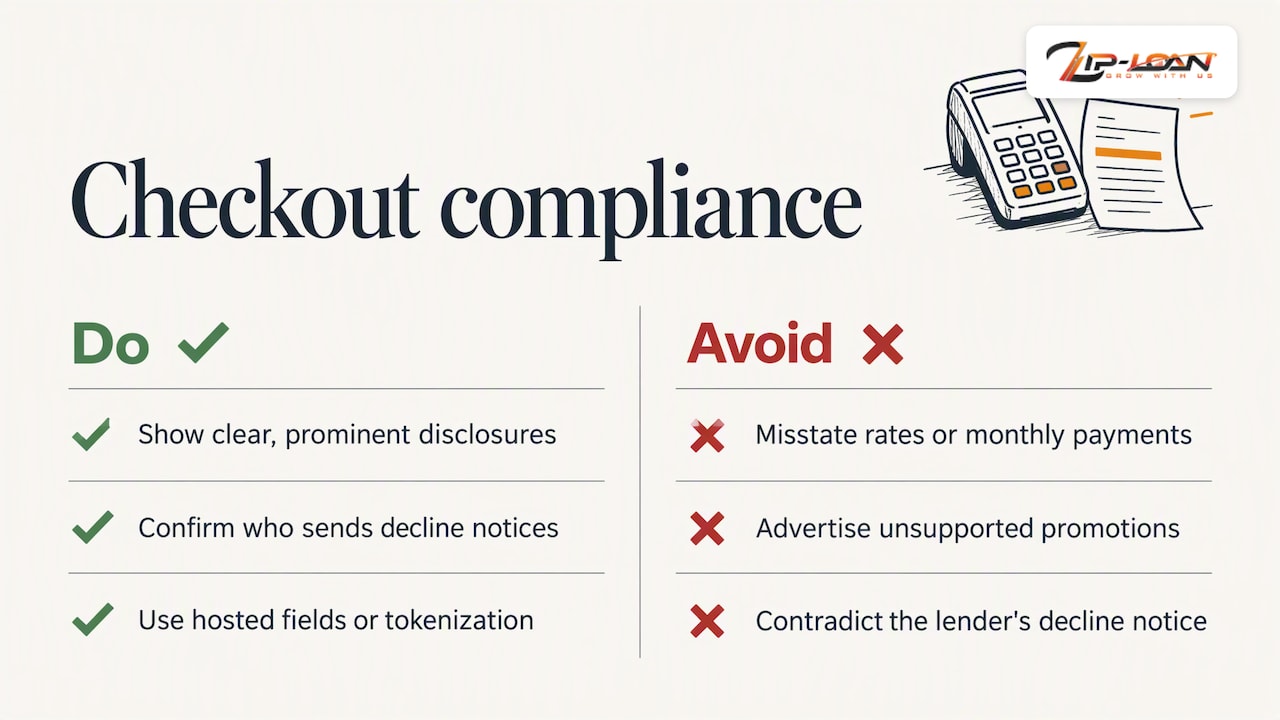
Disclosures and marketing claims. The CFPB’s consent order in the Sterling Jewelers matter, which alleged violations of the Truth in Lending Act and Regulation Z, bars misrepresenting financing terms such as interest rates, monthly payments and promotional-financing eligibility, and requires clear, prominent disclosures. It is a retail case, but the lesson transfers to any checkout: never advertise a monthly payment or promotion your lender’s terms do not support, and make sure staff describe the financing accurately.
Adverse action. When a lender declines an application, Regulation B governs the notice. The CFPB’s text of Regulation B on notifications sets out when a creditor must notify the applicant of the action taken and provide reasons. In most integrations the lender sends this notice, but confirm who does, and make sure your checkout does not tell a declined customer something that contradicts it.
Card data security. If your checkout touches payment card data, the PCI Security Standards Council states that the standard applies to all entities that store, process or transmit cardholder data. Embedded hosted fields, tokenization and point-to-point encryption reduce how much of that data ever reaches your systems, which narrows your compliance scope.
This is not legal advice. For a program with custom marketing, state-specific products or lease structures, have your attorney or compliance advisor review the flow before launch.
Test the integration, then measure it
Before launch, test every path:
- An approval, a decline and a counteroffer.
- A customer who abandons the application midway and returns.
- Full and partial refunds, returns and cancellations after funding.
- Mobile and desktop on ecommerce; terminal and tablet in store.
- Status events: confirm each triggers the right action in your system.
- Reconciliation: match a test funding record to its order and account.
After launch, track a short list of metrics:
| Metric | What it tells you |
|---|---|
| Financing view or offer rate | Whether customers and staff actually see the option |
| Application rate | How many who see it start an application |
| Approval rate | Whether your lender mix fits your customers |
| Take rate | Share of approved applicants who complete the purchase |
| Average ticket with vs. without financing | Whether financing lifts basket size |
| Time to funding | Cash-flow impact |
| Chargebacks, returns and support contacts | Operational friction |
Read the funnel from the top. A low application rate is a visibility problem, a low approval rate is a lender-mix problem, and a low take rate often means the terms or presentation need work. Our benefits of offering customer financing guide explains what to expect from each lever.
Where ZipLoan fits
ZipLoan gives retailers and service providers a platform to offer third-party consumer financing at checkout, with installment loans, lease options, no-credit-check financing and private label credit. It integrates with POS and ecommerce systems and supports single-lender or multi-lender setups, so you can match the program to your customers. If you are ready to compare options for your business, start with our guide to retail financing options or contact us through zip-loan.com.
FAQ
How long does POS financing integration take?
It depends on the method. A hosted link or portal can be used once your merchant account is approved, while plug-ins and embedded widgets need configuration and testing, and API builds follow your development cycle. Ask your provider for a schedule specific to your platform.
Do I need a developer to add financing to my checkout?
Not always. Hosted links, QR codes and platform plug-ins are usually set up by an administrator. A developer is generally needed for custom widgets, SDKs and API connections.
Can I offer financing to customers with poor credit?
Yes, if your program includes lenders and products built for lower credit tiers, which is the idea behind multi-lender platforms. Approval still depends on each lender’s criteria, and no program can promise approval for every applicant.
What fees should I expect?
Expect some combination of setup or license fees, transaction-based merchant fees and any customization costs. Get the full schedule, plus commitment length, termination fees and reserve terms, in writing before you sign.
Sources
- Google Pay API: Buy Now, Pay Later
- CFPB proposed consent order, Sterling Jewelers
- CFPB, Regulation B, section 1002.9 Notifications
- PCI DSS Quick Reference Guide
- Sekure Merchants: Compare Payment Processors
Recommended
- Square Financing Integration: Your Options for Customer Financing
- Shopify Financing Integration: Offer Customer Financing
- Integrate Financing on Your Site for Business Growth
- Reduce Cart Abandonment With Customer Financing: 2026 Strategy
Disclaimer: This article is provided by Zip Loan (Touch N Buy LLC d/b/a Zip Loan) for general informational and educational purposes only and does not constitute financial, legal, or professional advice. While we strive for accuracy, information may be incomplete, outdated, or subject to change without notice. Financing programs, rates, terms, and approvals vary by lender and applicant and are not guaranteed. Zip Loan makes no warranties regarding the information provided and, to the fullest ext