

You can add financing to a Shopify store in two ways: turn on Shopify’s own Shop Pay Installments, or activate a third-party financing provider as an additional payment method in your Payments settings. Both put a payment-plan option in front of shoppers at checkout. They differ in who qualifies, how much credit they cover and what you need in place first. A third product, Shopify Capital, is something else entirely: it finances your business, not your customers’ purchases.
This guide separates those three, walks through the setup steps, and shows where a single built-in option stops covering the shoppers you want to serve.
TL;DR
- Shop Pay Installments is the fastest native route, but it requires both Shopify Payments and Shop Pay to be active on your store.
- Third-party financing apps are activated under Settings > Payments > Additional payment methods, and usually need a separate account with the provider.
- Shopify Capital is working capital for you, offered by invitation inside the admin. It does not finance your customers.
- A single lender approves only part of your traffic. A multi-lender setup that routes declined shoppers to another lender recovers sales you would otherwise lose.
Table of Contents
- Three products that all get called “Shopify financing”
- Option one: Shop Pay Installments
- Option two: a third-party financing provider as an additional payment method
- Option three: Shopify Capital is a different job
- Why one lender rarely covers your whole customer base
- How to choose: six criteria
- Our perspective: treat financing as a funnel, not a button
- Work with ZipLoan on your financing mix
- A launch checklist for your Shopify store
- FAQ
- Sources
Three products that all get called “Shopify financing”
Search results for this topic mix up products that serve different people. Sort them first, because the setup, cost and risk are different for each.
| Product | Who it finances | Who gets approved | Where you configure it |
|---|---|---|---|
| Shop Pay Installments | Your customer, at checkout | The shopper, by the lender | Shopify admin, Payments |
| Third-party financing app or provider | Your customer, at checkout | The shopper, by the provider’s lenders | Settings > Payments > Additional payment methods |
| Shopify Capital | Your business | You, based on store performance | Finance page in the admin |
If you want customers to spread out a purchase, you need the first or second row. If you want cash to buy inventory or fund marketing, you need the third. Many merchants end up using more than one.
Option one: Shop Pay Installments
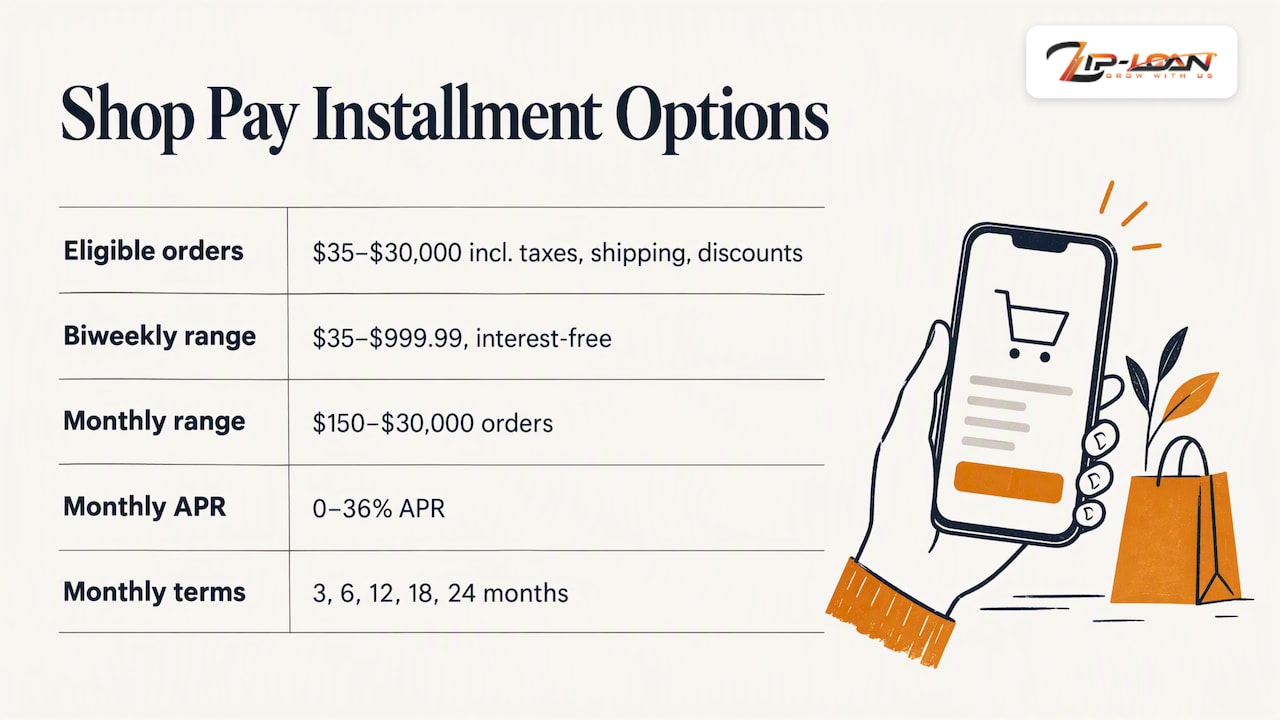
Shop Pay Installments is built into the Shopify checkout. Shopify’s FAQ states that, in the United States, eligible customers can pay for orders from $35 to $30,000, including taxes, shipping and discounts. Orders between $35 and $999.99 can be split into interest-free biweekly installments. Orders between $150 and $30,000 can use monthly installments carrying 0 to 36% APR, with terms of 3, 6, 12, 18 or 24 months.
The lending technology behind it is Affirm’s. BetaKit reported that the product keeps buyers from being sent to another website to finish the purchase.
What your store needs first
The eligibility requirements are specific, and missing one is the most common reason an installment offer does not appear:
- Shopify Payments must be active.
- Shop Pay must be active.
- If you run multiple entities, each entity has to meet the thresholds on its own. Availability is entity-specific, not store-wide.
- Your store needs to be in a supported country. Shopify lists the United States, Canada and the United Kingdom.
For you as the merchant, Shop Pay Installments is a payment method, not a loan. You are not borrowing anything. The shopper is approved, and the checkout experience stays inside Shopify, which is the main reason merchants use it to reduce friction.
Where it runs out
A native option is simple, but it has a ceiling. It is available only to shoppers who use Shop Pay and are approved by its lending partner. Shoppers who are declined have no second path in that flow. For a store selling $40 accessories, that may be acceptable. For a store selling $4,000 furniture, jewelry or home upgrades, the declined shoppers are often the ones with the highest intent.
Option two: a third-party financing provider as an additional payment method
Shopify lets you add outside financing at checkout. According to Shopify’s page on activating additional payment methods, these include options such as PayPal Express Checkout and buy now, pay later services. They appear as distinct choices at checkout.
The general flow looks like this:
- Open the Payments settings. In your Shopify admin, go to Settings > Payments.
- Find the additional payment methods area. This is where financing and buy now, pay later providers are listed.
- Choose your provider and select the option to activate it. Many providers send you to their site to sign in or create an account.
- Finish authentication. You will usually need a separate account with the financing provider, so allow time for its own merchant onboarding and underwriting.
- Place test orders before announcing anything to customers, and check how the option renders on desktop and mobile checkout.
- Add messaging on product and cart pages so shoppers see the payment option before they reach checkout.
Our own guide to setting up customer financing covers the business-side steps that surround this technical part: choosing programs, training staff and presenting offers.
Keeping your current card processor
A common worry is that adding Shopify-connected features means giving up the processor you already use. It does not have to. Shopify documents that you can use Shopify Payments alongside a direct third-party provider: your third-party provider remains the primary processor for credit and debit cards, while Shopify Payments handles additional features. Shopify also notes that more than 100 third-party credit card providers are available, either as your sole processor or alongside Shopify Payments.
This matters for planning. If you want Shop Pay Installments, you need Shopify Payments active. If you want a separate financing provider, you do not need to change your main card gateway, but you should confirm with the provider which setups it supports.
Option three: Shopify Capital is a different job
Shopify Capital belongs in this conversation only because it shares the word “financing” in search results. It funds your operations. In the United States, Shopify Capital loans are provided through WebBank as a lump sum in exchange for a fixed borrowing cost, set out in your loan agreement.
A few details that affect planning:
- You cannot apply at will. Shopify says offers go to eligible merchants, with eligibility evaluated automatically from factors such as sales, disputes, customer interactions, time on the platform and compliance. If no offer appears in your admin, there is nothing to apply for.
- Review is fast once you apply. Shopify’s US page describes reviews typically within 1 to 3 business days after you apply from the Finance page.
- Repayment follows your sales. Repayment is taken as a percentage of store sales. Shopify’s US page also states that, as of March 9, 2026, new loan repayments are collected from your Shopify Payments balance, and you should check whether older loans still use bank debits.
- A flexible account is in early access. Capital flex accounts are available only to certain US merchants who already use Shopify Capital.
Shopify Capital does nothing to raise your conversion rate on a $2,500 order. It may fund the inventory behind that order. If you are comparing it with loans from outside lenders, this reference on external business financing alternatives can help frame what sits outside the Shopify ecosystem. Keep the two decisions separate: how you fund the business, and how your customers fund their purchases.
Why one lender rarely covers your whole customer base
Every lender has an approval box. Prime-focused programs approve shoppers with strong credit profiles. Others serve near-prime or subprime shoppers, lease-to-own structures serve those with limited credit history, and some programs use soft-pull pre-qualification so a shopper can see options without a hard inquiry. A merchant offering only one product is, in effect, choosing one box for every visitor.
The gap shows up in high-ticket categories:
- Automotive repair: a $1,800 brake and suspension job is rarely planned, and shoppers with thin credit are common. See our auto repair payment plans guide.
- Healthcare and elective procedures: patients often decide in the consultation room, not weeks later.
- Home improvement, furniture and jewelry: larger tickets mean more shoppers at the edge of approval.
If your Shopify store sells in these categories, ask a practical question of any financing setup: what happens to the shopper who is declined? An automated waterfall, where a declined application cascades to the next lender in a sequence, turns that dead end into another chance to complete the sale. Our overview of waterfall lending for retail financing explains the mechanics, and our piece on second look financing covers recovering declined customers.
How to choose: six criteria
Use these to compare Shop Pay Installments, a single third-party provider and a multi-lender platform.
- Credit coverage. What share of your typical shoppers can be approved? Ask each provider for approval-rate expectations in your category, not a national average.
- Order-size fit. Shop Pay Installments begins at $35 and tops out at $30,000. Check that the range matches your average and highest tickets.
- Merchant cost. Providers charge fees that vary by terms and transaction size. Get the rate card in writing and compare it against the margin on the products being financed.
- Funding and risk. Ask whether funding is non-recourse, meaning the lender, not you, carries the risk if the customer defaults, and how quickly funds reach your bank account.
- Checkout fit. Check where the offer appears on product pages, cart and checkout, and whether shoppers leave your site to apply.
- Fallback path. Confirm what a declined shopper sees. A message that simply ends the conversation costs you the sale.
For a wider view of program types, including installment loans, lease options and private label credit, see our guide to types of customer financing options and the retail financing guide for 2026.
Our perspective: treat financing as a funnel, not a button
Most merchants treat financing as a payment-method checkbox. Turn it on, add a badge, move on. In our experience that undersells what financing does for a merchant, because the real work happens before and after the checkbox.
We built ZipLoan around a simple view: a merchant should not have to decide in advance which kind of customer deserves a payment plan. Credit profiles vary widely across a retailer’s traffic, from shoppers who qualify for the best terms to those who need a different structure. That is why we offer finance programs for all credit types, as a single-lender solution or as a multi-lender platform, with an application process designed to be quick and payment programs tailored to the merchant’s category.
For a Shopify store, that translates into three habits we recommend:
- Use the native option where it fits. If Shop Pay Installments covers the bulk of your buyers and your tickets are modest, there is no reason to complicate checkout.
- Add a second layer for the shoppers it misses. High-ticket categories justify a provider that can route a declined shopper onward rather than ending the session.
- Measure the result by approved-and-completed orders, not by offers shown. An offer nobody can be approved for is just decoration.
That is also why we encourage merchants to read the fine print of every program, ours included, before committing.
— Joe
Work with ZipLoan on your financing mix
If you sell higher-ticket products or services and want financing that reaches shoppers across the credit spectrum, ZipLoan provides a platform for retailers to offer third-party consumer financing at checkout. It supports installment loans, lease options, no credit check financing and private label credit, and it integrates with POS and ecommerce systems for categories such as automotive, healthcare, home improvement, furniture and jewelry. Our clients have given us a 4.9 out of 5 rating across more than 95 consumer reviews. Review how to offer payment plans to your customers, or visit zip-loan.com to see which program fits your business.
A launch checklist for your Shopify store
Before you switch any financing option on, run through this list.
- Confirm prerequisites. For Shop Pay Installments, verify Shopify Payments and Shop Pay are both active, and check each entity if you run more than one.
- Decide the role of each product. Write down which tools serve customer purchases and which serve your own cash flow.
- Complete provider onboarding early. Third-party providers often require their own account and review, which can take longer than the Shopify steps.
- Test the full flow. Place test orders, check mobile checkout, and look at what the order confirmation and your admin show.
- Train your team. If staff quote prices over chat, phone or in a shop, they need to explain payment options accurately and never promise approval.
- Message financing early. Mention payment options on product pages for larger items, since shoppers compare monthly cost before they reach checkout.
- Review terms and disclosures. Financing involves lending terms and consumer disclosures. Have your attorney or compliance adviser review your marketing language before launch, particularly any APR or “no credit needed” claims.
- Track results monthly. Compare conversion rate, average order value and the share of financed orders before and after launch.
If you are still working out program terms with providers, our merchant financing program requirements guide lists what enrollment generally asks of you, and our piece on integrating financing on your site covers the website side.
FAQ
Can I add financing to Shopify without Shopify Payments?
Yes, with a third-party provider. You activate it under Settings > Payments as an additional payment method and usually create an account with that provider. Shop Pay Installments is different: Shopify requires both Shopify Payments and Shop Pay to be active for it.
Is Shop Pay Installments a loan I take out as the merchant?
No. It is a payment method your customers use at checkout, and the shopper is the one approved for the installment plan. Shopify Capital is the product that lends to you as the business.
Can I apply for Shopify Capital whenever I need cash?
Not on demand. Shopify evaluates eligibility automatically and extends offers to eligible merchants, so you apply only after an offer appears in your admin. If you need funding outside that cycle, you would look at lenders outside Shopify.
Can I keep my current payment processor and still offer financing?
Yes. Shopify allows a third-party provider to remain your primary card processor while Shopify Payments handles additional features. Check with your financing provider which combination it supports before you configure anything.
What happens when a customer is declined?
With a single lender, the shopper usually leaves with no further option. A multi-lender setup can pass the application to another lender, which is why we recommend asking any provider what the declined path looks like.
Sources
- Shopify Help Center: Shop Pay Installments FAQ
- Shopify Help Center: Shop Pay Installments eligibility requirements
- BetaKit: Shopify and Affirm open access to Shop Pay Installments for US merchants
- Shopify Help Center: Activating additional payment methods
- Shopify Help Center: Using Shopify Payments with a third-party provider
- Shopify Help Center: Third-party payment providers
- Shopify Help Center: Shopify Capital loans and repayment in the United States
- Shopify Help Center: Shopify Capital eligibility
- Shopify Help Center: Shopify Capital flex account
Recommended
- How to Offer Financing to Your Customers
- 2026 Merchant Guide to Setting Up Customer Financing
- Integrate Financing on Your Site for Business Growth
- How to Advertise Customer Financing
Disclaimer: This article is provided by Zip Loan (Touch N Buy LLC d/b/a Zip Loan) for general informational and educational purposes only and does not constitute financial, legal, or professional advice. While we strive for accuracy, information may be incomplete, outdated, or subject to change without notice. Financing programs, rates, terms, and approvals vary by lender and applicant and are not guaranteed. Zip Loan makes no warranties regarding the information provided and, to the fullest ext